Showing posts with label edtech. Show all posts

The Sidekick & The Superhero: Using Google Drive for Peer-Assessment


"The Sidekick & The Superhero: Using Google Drive for Peer-Assessment" (Originally published at GettingSmart.com on 12/26/12.)

“More efficient than an overworked teacher! More reliable than a carry-home satchel of ungraded papers! Able to simultaneously curate infinite comments from speedily working students! Look! On the computer screen! It’s an aggregator! It’s a sharing point! It’s Google Drive!Yes, it’s Google Drive…free application offered by the California-based internet giant with resourcefulness and organization more astounding than some seasoned educators of many years. Google Drive…which can offer students forms to submit comments, make students’ documents easily accessible in one location, and which, disguised as your average that-can’t-be-awesome-‘cause-it’s-free app, helps create an engaging and effective class of proficient learners through reliable and efficient technology.”All right. I know it sounds cheesy, but the above parody perfectly reflects my excitement and enthusiasm upon conceiving my latest AP Language lesson plan. It is exactly how I felt. Although I have been using Google Drive in the classroom for the past two years, the recent success and simplicity of my students’ last assignments have driven me to identify a superhero in Studio 113. And it is definitely not me.

A Challenging Task: The Impetus for Using Google Drive

Just two and half years into teaching AP Language, I oftentimes feel absolutely powerless, helpless, and overwhelmed. Creating and locating valuable content is a never-ending process, and the challenge of preparing students for a four-hour test consisting of upper level multiple-choice questions and three free-response essays is daunting. Nonetheless, backed by a colleague’s assurance that I will eventually feel comfortable teaching this course after about five years, I continually remain open and flexible to any resource that will help my students reach their goal of passing the rigorous AP Language exam.With a teaching schedule consisting of six classes ranging from AP Language to American Literature Honors and only fifty minutes of planning, I heartily accept any help I can get. Fifty minutes of planning is not enough time to punch in grades and answer e-mail, let alone respond to the bottomless in-box of students’ writings. One thing is for sure, however. Students’ educational growth should not suffer because of a lack of time and absence of any teacher super powers. Needless to say, this is where I call on a superhero.

The Lesson Plan: Using Google Drive as a Tool, Not the Toy

To succeed on the free-response section of the exam, students simply need to write more and receive constructive criticism. Quite honestly, I am lucky to return a class set of essays within two weeks, and that is assuming I grade for hours on the weekend. I needed a plan of attack that would highlight and clarify, once and for all, each student’s writing weaknesses. This strategy would allow us to open the second semester with an accurate set of data that would pinpoint areas where my lessons failed during the first semester while revealing any pre-determined, second-semester plans needing immediate restructuring.So, I asked my AP Language students to write one analytical, one argumentative, and one synthesis essay in the final three weeks preceding the winter holidays. I informed them that each essay would be peer-assessed at least twice and all feedback would be submitted via an embedded Google form on my teacher page. To keep the writers and peer-assessors anonymous, I assigned each student a number. With two classes of AP Language and the randomness of the numbers, students had no idea of the papers’ authors.

Here is the order of operations for each essay assignment:

  • Day 1: The students and I spent one class period examining the writing prompt. During this time, we used our AP Language infographic to review the guidelines of the particular type of essay, and we thoroughly discussed all accompanying excerpts and resources for each prompt.
  • Day 2: Students wrote the essay in timed fashion on the following day. Although fifty-minutes of writing after having already ingested the entire prompt is too much time according to the AP Exam timeline, the bell-to-bell setup added an appropriate level of pressure at this stage in the students’ writing development.
  • Days 3-4: Students were randomly handed a peer’s paper and asked to use the Google Form to submit their feedback. I used the free-response open rubric as a guideline when I created the survey. Students worked through their assigned papers in a systematic way that ultimately lead them into scoring the essay according to the college board’s 1 to 9 scale.
  • Homework and Downtime: Students were granted access to the live, shared spreadsheet on my Google Drive, and they were encouraged to check the feedback submitted for their personal papers during any downtime or for homework. Just before beginning the next essay assignment, I informed the students of the polished and numerically organized Excel spreadsheet of feedback on my teacher page. I used two tabs in Excel: one organized by writer and the other by assessor. For sake of easy navigation within the Excel spreadsheet, I made each row single-sized and asked students to click on the appropriate cell to read the comments in the formula bar.
  • This four-day sequence was administered three times, once for each type of essay. Obviously, this game plan left us with three remaining days before breaking for the holidays. Two of these days were spent completing diagnostic grammar and writing exercises in order to prepare the students for the final, and perhaps most important, phase of the lesson plan.

The Final Phase: The Self-Assessment

The final phase of our three-week plan was simple: complete an honest self-assessment. Using this embedded self-assessment, students were encouraged to review their peers’ constructive criticism of their three essays and to recall any challenges presented by the diagnostic grammar exercises in hopes that they would be able to submit accurate data.This is the only spreadsheet that will not be shared with the entire class. There is no need to share it, except to simply review with each student on a one-to-one basis. The spreadsheet of students’ data will act as a springboard for next semester’s highly differentiated lesson plans.

The Pros and Cons

  • Teachers are allowed to circulate the classroom and help each student as he/she struggles through understanding what constitutes a paper scored a 3, 5, or even an 8.
  • Teachers are afforded time to read essays during the writing and peer-assessing periods. Out of necessity, the reading of most papers will be prompted by the students’ continuous challenges with the text.
  • Allowing students to work side-by-side with their peers on their mobile devices (smartphones, tablets, or checked-out laptops from the media center) fosters inquisitive communication that is based entirely on determining how to accurately assess an AP Language essay.
  • Students are completely clear about what is expected on the free-response portion of the exam.
  • Students are aware of their writing strengths and weaknesses.
  • Students can be active participants in their own education while continually prescribing and requesting certain activities for their own self-improvement.
  • The cons? No Kryptonite here. I have not discovered a weakness for Google Drive, yet.
There is no doubt that I feel very confident with this lesson plan, and I cannot wait to return and begin to differentiate lessons for each student. The level of confidence is quite powerful. I feel faster and more effective than an automated essay scorer, stronger than a completely rested teacher on a Monday morning, and able to leap tall stacks of essays in a single reading.But wait a minute! That’s not how a sidekick is supposed to feel. That sounds more like the power of a superhero…the power of Google Drive, a modern-day, educational crusader.

5 Teaching Habits to Tame Time

"5 Teaching Habits to Tame Time"

(First published here on GettingSmart on 10.30.2014)

Something kicks my posterior way too often. It’s a frenemy of mine, you see. Yep, that’s right. FREN-E-MY. Think of polar opposites. Some days are swing and duck, while others are smile and enjoy good luck. Are you picking up what I’m laying down? I’m speaking of that ceaseless, consistent, and never-changing thorn in my side…and friend by my side. Time. As a high school Language Arts teacher of eighteen years, I continually challenge myself to be more disciplined and efficient while improving productivity, quality, and creativity. I’m trying my best, and usually that suffices. Let’s take a look at five ways I’m attempting to tame time.

Organized Bookmarks

Think about it. How many occasions have you re-searched for an educational resource that you used just last week? Can’t remember the name exactly? Hmmm. That doesn’t help. Guess the only thing to do is keep searching. Meanwhile, the clock keeps ticking. Take a look at how something so simple can help you spend time so wisely.

Imperfect Screencasts

All right. Don’t let me offend anyone here. However, have you ever found yourself on a Friday teaching a co-worker the same concept that was shared with other colleagues Monday through Thursday? Was it something that could have been screencast or video recorded? If so, go ahead and do it. Not only will you save time by sending your colleagues hyperlinks to your screencasts or video recordings, but your forward-thinking co-workers will also be able to pause and replay as they practice the very same concepts you have taught. And don’t worry about getting your recordings perfect. If perfection is a part of your plan, you will defeat the purpose and lose all kinds of time. A screencasting guru once told me, “Whether you burp, your dog barks, or your wife hollers at the kids in the background, keep right on screencasting and recording. ‘Cause if you stop at every little imperfection, you’ll never finish. Plus, all that’s real. So be real.” Screencast-O-Matic and Jing are two free programs to use. However, if you can swing it monetarily, Camtasia rocks. Please find below one of my better screencasts and a hyperlink to many more here.

Virtual Meetings

I’m all for the face-to-face meetings. Physically being in a room full of enthusiastic educators adds a much needed jolt to teachers’ psyches. However, sometimes the extra time it takes to navigate a long walk across the campus, to engage in an impromptu conversation, to disengage from that same conversation, to ascend a flight of stairs, and to wait an extra five minutes for a late colleague to arrive makes a Chevrolet 454 engine seem fuel efficient. Oh, how I sometimes want to simply stay put and use a video conferencing tool to connect with my colleagues and collaborate in a scheduled meeting. It really is so easy. Google Hangouts, Skype, and Microsoft Lync are all valuable technology tools that allow people to meet in a very efficient manner. Google Hangouts and Lync allow up to 10 people on one video call, while Skype boasts a maximum number of 25 in a group video call. As if virtual meetings with colleagues aren’t enticing enough, don’t forget about joining classes with a fellow teacher in another school district to team-teach. It may sound complex, but the only tough part is trying to match up class times. Although I have only shared classes through Microsoft Lync with teachers from my school district, the process was awesome. I will definitely try again soon.

Google Forms

I jokingly tell people all the time, “Using Google Forms can help solve just about any issue…maybe even world peace.” Seriously, though. A precisely constructed Google Form can not only create magic in your classrooms, but it can also save so much time when gathering resources among teachers. Instead of spending hours upon hours discovering helpful videos, current events, lesson plans, and other valuable internet resources, simply create a Google Form and share it with your colleagues. True synergy then occurs as a group of focused educators scramble to share their favorite resources. Watch the video below to take a quick look at this process in action.

Tweetdeck and Twitter Lists

Let’s be real. If someone is “following” 20K people on Twitter, there is no way those interesting tweets are all being read. There is not enough time in the day. Heck, I am following over 600 and would like to follow more, but I find it challenging at times to keep up with the overwhelming amount of awesome information that flows directly to me. What is my solution? Two things. 1. I use Tweetdeck to effortlessly browse certain hashtags or members of my PLN. By setting up only my desired columns, I can easily scan #edchat, #edtech, and #engchat hashtags all at once. 2. Creating and using Twitter lists also saves me a bunch of time. When I follow someone new, I immediately add him/her to one of a multitude of lists with titles that include: edadmin, ELA, educators, edtech gurus, and many more. Here's a quick video tutorial to get you started. So when you find time is kicking your rear end at work, take just a second to give yourself a hand and replace analog with digital. Will you be more efficient, productive, creative, and...happy? Who knows. Only time will tell.  

3 Quick & Easy Apps to Turn Homework into AnyTimeWork

(Originally published on gettingsmart.com on September 23, 2013.)

As someone who seeks to make truly blended learning as seamless and ubiquitous as possible, I am constantly on the search for smartphone apps that will help students show mastery of knowledge no matter where they are. Let’s face it. The word homework gets a bad rap. Now, I am not one of those teachers who thinks students should work their butts off in class only to go home and log in another two or three hours, eat poorly, and go to bed around 2:00 a.m. Sure, homework is necessary at times, but I prefer students to be challenged from bell-to-annoying bell and then go home and practice other valuable lessons, such as: eating dinner with their families, participating in physical activities outside cinder block walls, relaxing and recharging near a pond with a pesky fish on the other end of a line, or chasing those passions and dreams that are so often ignored in more traditional educational settings. One way to alleviate the stress incurred from a hectic afterschool schedule is to take the “home” out of homework. That’s right. With a projected “1.4 billion smartphones in use by December,” the solution is simple. Students should be taught the power of their smartphones to extend their classroom knowledge and express their curiosity at any time, anywhere. In fact, three quick and easy smartphones apps to leverage the power of anytimework are Lumify, Snapguide, and Shadow Puppets.

Video Editing in No Time with Lumify

For students on-the-go who want to create a video for an “anytimework” assignment or to connect their newfound skills with the world around them, Lumify is perfect. Not only does Lumify offer four modes of sharing/saving (Lumify, YouTube, camera roll, or e-mail), but the ability to add an infinite number of songs directly from a smartphone’s music collection, to completely customize any audio or voice-overs, to trim all video clips, and to keep the entire process simple is absolutely awesome. Check out this test run from my colleague, Wes Vonier. He is offering Lumify as a way for his students to practice Spanish everywhere and any time. For more information about Lumify, check out their blog site and their smartphone app.

Create How-To Guides with SnapGuide

Although SnapGuide does not have a category for K-12 education (Are you listening, SnapGuide?), this powerful, and easy-to-use, smartphone app and website has huge academic potential. Whether students are creating guides to solve math equations, teach the writing process, construct a self-propelled car for Physics, help peers produce a creative product, analyze a literary character through acting, or simply link a class concept to something witnessed while loafing in town on a lazy Sunday afternoon, the creative and didactic possibilities of sharing photos and videos with textual explanations is limitless. Who knows how students will react when they realize education is all around them. Heck, I’m even contemplating using SnapGuide as a way to document and share some of our interactive learning structures from Studio 113 and E.P.I.C.C. Academy. Take a look at my first SnapGuide here.

Add Narration to Your Story or Slideshow with Shadow Puppet

Check out Shadow Puppet for giving a voice to stories or slideshows. After adding images, Shadow Puppet allows the creator to drop in an explanatory voice-over. Although this app does not accept videos, it is just as simple to use as SnapGuide. Take a look at this example from Dr. Lisa Sheehy as she pretends to be a student who narrates the process of solving a math problem. Surely you are wondering what the cons are for these three apps. Well, the only negative I have found is their absence in the Android and Windows smartphone markets.  For now, they are only available on iOS. However, considering their efficiency, simplicity, and reliability, there is reason to believe that they will be available on other platforms soon. One thing is for sure. With the help of Lumify, SnapGuide, Shadow Puppets, and the multitudes of other creative smartphone apps, homework is no longer just for home. It’s for any time and anywhere. Now, isn’t that how learning should be?  

36 Codes, an OWL, a Pitch Counter, and a Headset: Nontraditional Tools for Nontraditional Feedback

(Originally published on gettingsmart.com on September 23, 2013.)


Just like many educators, I am always working towards improvement, and my incessant quests for enhanced teaching and professional practices usually stem from a desire for one thing: quality feedback for my students. Obviously, to reach this goal on a daily basis, efficiency is paramount. Whether I am speed-reading a stack of e-mail, tweeting out class reminders for our new E.P.I.C.C. Academy, or creating online content to facilitate personalized learning, the goal of efficiency (and, as always, creativity) is at the root of my daily practices. Likewise, I am constantly experimenting. One such experiment these past six weeks has led me to a newer, more efficient mode of assessing students’ essays. Yep, it may sound a bit eclectic at first, but the only tools I currently use to provide valuable, timely feedback for my students’ writings are 36 codes, an Owl, a baseball pitch counter, and a headset.

36 Codes and an OWL

Call me a slow learner if you want, but I grew tired and frustrated after many years of crafting thoughtful paragraphs of feedback on my students’ papers only to watch them get trashed after their numerical grades were ascertained. This disappointment led me to develop an ever-evolving spreadsheet of grading codes and relevant links. These thirty-six codes have worked very well for the thousands of essays I have graded the last few years, but the effectiveness of these one-to-three character codes was taken to another level when our district recently did something amazing…students were given Google Drive accounts. This breakthrough, along with knowledge gained from this blog post from Catlin Tucker and the availability of Purdue University’s Online Writing Lab (OWL), has totally transformed my process for assessing students’ work. Take a look at the process here.
 

A Pitch Counter

To be even more efficient, I borrowed an idea from my days of playing and coaching baseball. A baseball pitch counter, which is obviously used by coaches to protect their players from overthrowing, can come in very handy when trying to quantify any particular area of focus when grading students’ essays. Sometimes I click and click to get an understanding of how students struggle with sentence fragments, run-ons, or comma splices, while other times I search for the number of ideas that support the students’ well-crafted thesis statements. Whatever it may be, the little gadget that cost me a mere $8 is oh so valuable.

A Headset

I remember using Audacity and a pile of students’ flash drives about five years ago to “voice grade” a set of AP Language essays. My colleague and I decided to give it a try, and the results were overwhelming. Students said the feedback via .mp4 audio files was some of the best they ever received. Since it did not take nearly as long for us to articulate our criticism as it did to write those same thoughts, we were relatively efficient. However, we encountered two problems: 1. Managing a multitude of students’ jump drives 2. Not having an effective technique for highlighting key areas within the pupils’ essays. Flash forward to 2013. Thanks to Jen Roberts, I learned how to add voice comments through Google Drive. This particular site, 121Writing, is now Kaizena. This powerful site has been revamped to accommodate teachers’ wishes and to make every aspect of assessment more efficient. From the ability to record multiple comments and send them all at once to the ease of underlining text or submitting written feedback, Kaizena is a teacher’s dream. Here it is in action.
   
Who knows what the future holds for teacher assessment. Maybe years from now I’ll look back at these grading tools, laugh at their assumed improbability, and discuss the presently unimaginable gadgets that line my feedback toolbox. For now, however, I’ll stick with 36 codes, an OWL, a pitch counter, and a headset.

Powerful Apps to Empower Powerful Writing

(Originally published on gettingsmart.com on September 10, 2013.)

After the first four weeks of school, one truth is clear. The majority of my students are not very fond of writing. As a Language Arts teacher and one who writes for enjoyment, I find this alarming. I first became aware of this overwhelming fact by studying my students’ Google form submissions, which were designed to shed light on their talents, academic strengths and weaknesses, educational backgrounds, and wishes for learning activities in our new blended learning academy. This invaluable data, which I collect at the beginning of each school year, was validated even more when I discussed the writing process face-to-face with individual students. No worries, though. I have a plan. What might that be? To unveil an unaware passion for writing by guiding students through powerful writing experiences with powerful writing apps.

Brainstorming with Mindmaps

As we all know, most students’ writing struggles begin with no beginning. They engage in personal mental warfare by volleying potential ideas back and forth until the only things that get spiked are their crumpled up sheets of paper, and since so many students are visual learners, they end up with no conceptions of their introductory paragraphs. No plans, no visuals, no start, and, ultimately, no power to continue. Enter mindmaps. Websites and apps like bubbl.us, Mind42, Mindjet, and RealTimeBoard provide students with user-friendly technology tools that help them organize and plan masterful compositions. No more writing fatigue caused by indecisive and unorganized brain chatter. Just a strong foothold at the “Start Line” of the prose, a clear understanding of the academic task, and a rock-solid game plan for excelling at the composition’s “Finish Line.” If you’re interested in learning more about the first three sites mentioned, please visit the “You’re Making Me” YouTube Channel for excellent video tutorials. Click here for a test-drive of RealTimeBoard.

Bridging the Writing and Talking Divide with Voice-to-Text Software

I may be slow sometimes, but I am no dummy. I realize the process of inspiring an unwilling writer to pour his thoughts and emotions into black letters on a white canvas is much more convoluted than simply saying, “Just talk.” However, the power in my students’ eyes last week when I used our Apple TV wifi connection to show them how Dragon Dictation converts my thoughts and words into a coherent and solid introductory paragraph was palpable, to say the least. If you have just one student who is reluctant to think through a pen, please click here and take a few minutes to see for yourself the writing muscle exhibited when Dragon Dictation flexes its digital ears.

Setting the Writing Mood

All right. Prepare yourself for this. I am about to reveal two apps that are incredibly effective at inviting students into the writing zone…you know, that one foot area of connection between a writer’s heart and mind where thoughts and emotions flow into beautifully scripted sentences like water cascading over a precipice of smooth rocks. And here they are…. Dun-dun-duuuun. The light switch... ...and... The play button. That’s right. Simply turning off those annoyingly bright, overhead lights and replacing them with soft corner lamps will entice students to relax just a bit and listen to their inner voices. If that’s not enough, try hitting play on a hypnotic, looping sound like this. Trust me. Setting the mood for writing time makes all the difference. See it in action here. If the use of these two apps are not possible for whatever reasons, give OMMWriter a look. Here’s the well-written explanation awaiting you on their website: “OmmWriter is your own private writing room where you can close the door behind you to focus on your writing in peace. Everywhere you go, you have access to a beautiful distraction-free writing environment where your authentic voice is free to go where it is meant to go.”

Sharing with a Larger Audience

Not too many students get excited about submitting their essays to me. Sure, some are eager to see how they scored and what they truly need to work on, however, most are absolutely ecstatic over the prospects of the entire world reading their musings. I understand. I feel the same way. Obviously, this is where the power of blogspots like WordPress and Blogger shine. Students can tailor these sites to reflect their personalities, topics, and authentic voices. Resting in their seats is not the only way they can publish their writings to the world; posting for all to see is just a click away on any smartphone or internet-capable tablet. As always, teachers can do a lot to help with exposing their students’ writings to a larger audience by repurposing websites like Symbaloo. With a thorough game plan like this one, Symbaloo can serve as a one-stop shop for your students’ original thoughts. And what about your students? How can they promote their essays, journals, and blogs? Don’t worry. They already know. I’m sure they’ll use prominent social media sites like Twitter, Facebook, Google+, and Instagram.

Lightening Students’ Loads with a Digital Backpack

By encouraging students to use Google Drive in lieu of Microsoft Office and WeVideo instead of MovieMaker Live, my colleagues and I have nearly eradicated backpacks. Through an open BYOD policy and the luxury of a 1-to-1 tech-to-student ratio, our students are entering class many days with their internet capable gadgets or nothing at all. What’s even cooler than that, however, is the simplicity of students sharing and collaborating through Google Drive. Seriously, take just a few steps in our blended learning academy and you’ll surely see teams of three to four working on one, shared document. With the power of WeVideo in Google Drive, you may even see students recording directly from their laptops and teaming up to render one, awesome video. I would be remiss if I didn’t divulge my favorite aspect of Google Drive…grading with voice comments. Seriously. It is way too cool. Here’s how it’s done. Hopefully, these apps will serve you well, but please take a minute and post a comment about your most powerful writing apps. Who knows. If we work together, we may claim ourselves to be educators fit enough to carry a fifty-pound pencil, untether a shackled keyboard, or flip through an endless spiral notebook of blank paper… Or just powerful enough to introduce emerging writers to themselves.  

Tupac & Einstein: Now That's Blended Learning

(Originally published on gettingsmart.com on August 29th, 2013.)

I can honestly remember sitting in a high school Language Arts classroom as a sophomore in 1990 and thinking, “Man, there has to be a better way of learning than this.” But I was that pimple-faced, just-want-to-play-sports, socially awkward kid who tried his best not to be noticed due to an affliction of P.S.S., or Painfully Shy Syndrome. I wasn’t about to voice my criticism. Truth is, however, my inner voice was screaming so loudly for alternative ways of proving my knowledge, of revealing my talents, of challenging myself to conquer personal weaknesses, of stimulating my desire to learn by being physically active in class…anything other than the usual drill of lecture, read, and worksheet. You know what I mean. I was longing for a Shakespeare rap in the style of Public Enemy, an improvisational acting of Jem and Scout’s scary, nighttime walk in To Kill a Mockingbird, or maybe just the creation of a totally original short story to demonstrate my understanding of character development. Heck, my simplest classroom wishes had me daydreaming of a teacher who found some way of invoking all students’ voices to form a symphony of diversity via anything other than the one-size-fits-all pedagogy. Now, I’m not going to lie and say I had visions of multi-touch screens that accessed a world of knowledge by wirelessly connecting to a digital, infinite library. If that were true, I wouldn’t be writing this blog post, but instead I would be stretched out with my feet propped up while I watched the sunset on Lake Washington as a 40-year-old retiree of Silicon Valley. Oh, but I am far more blessed than that. You see, I, along with Dr. Lisa Sheehy and Wes Vonier, facilitate learning in a classroom with infinite possibilities. Not only is it a classroom where personalized and asynchronous learning dictate the students’ individual paths, but it is a classroom where creativity reigns supreme through flexibility, shared classroom ownership, and a superfluity of educational choices. Think of it as a classroom where all types of learners can succeed…on their terms. You know, students as diverse and different as, say, Tupac Shakur and Albert Einstein. Hmmm. Tupac and Einstein? Now that sounds like a unique blended learning academy. Let’s take a tour.
   

Want to see another Wax Museum version of our introduction? This one features live music. Click here.

The Seven Zones

In order to efficiently structure our classroom in some organizational manner and to accommodate all types of learning styles and activities, we established seven zones that bear the names of famously different learners. These names will remain for a half-semester, at which time they will be replaced by the names of other unique learners. Ultimately, our pie-in-the-sky goal is to end the year with the zones renamed in honor of our current students. Here is a brief introduction of our seven zones:

The Yousafzai Zone and a Welcoming Collage of Greatness

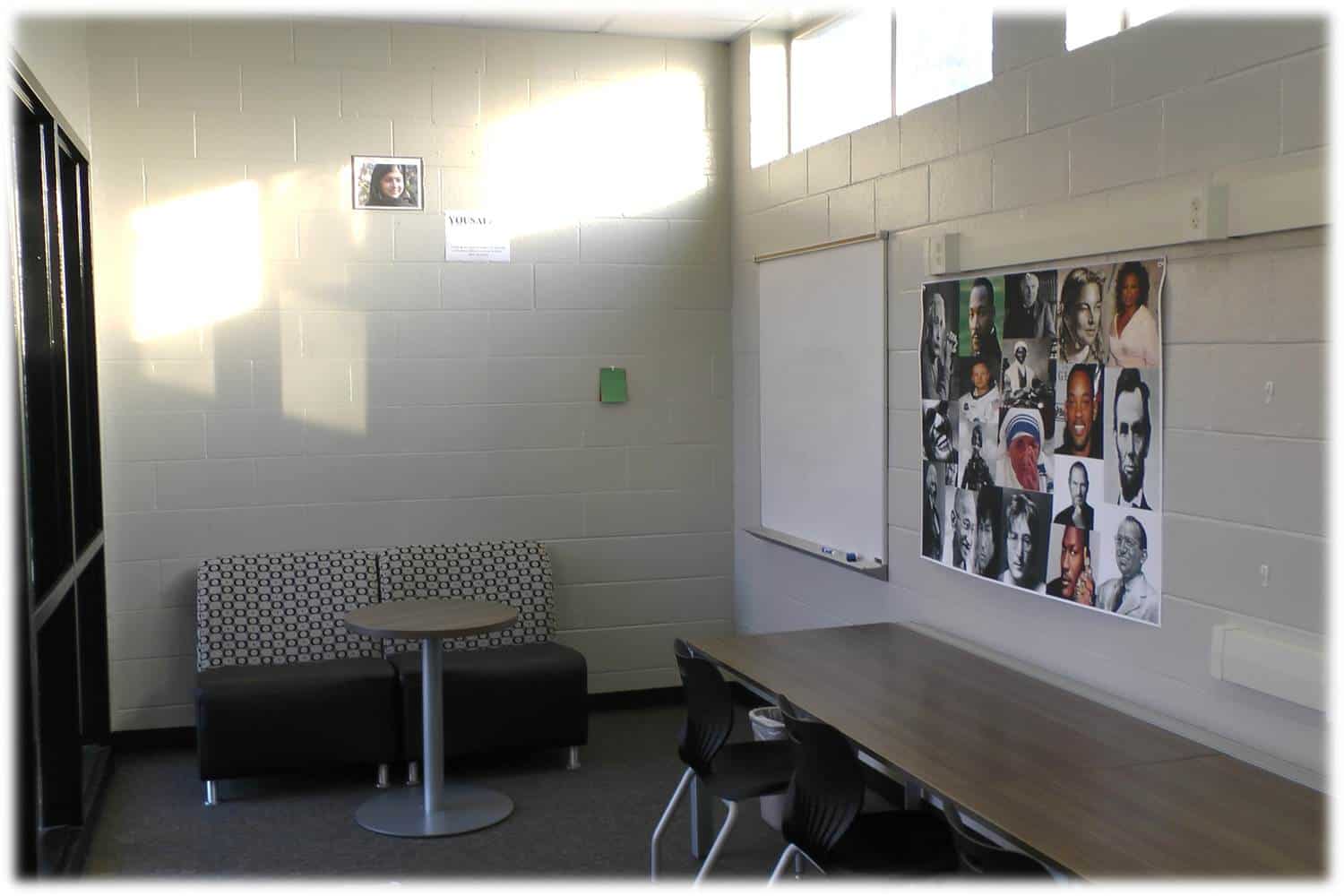
Yousafzai
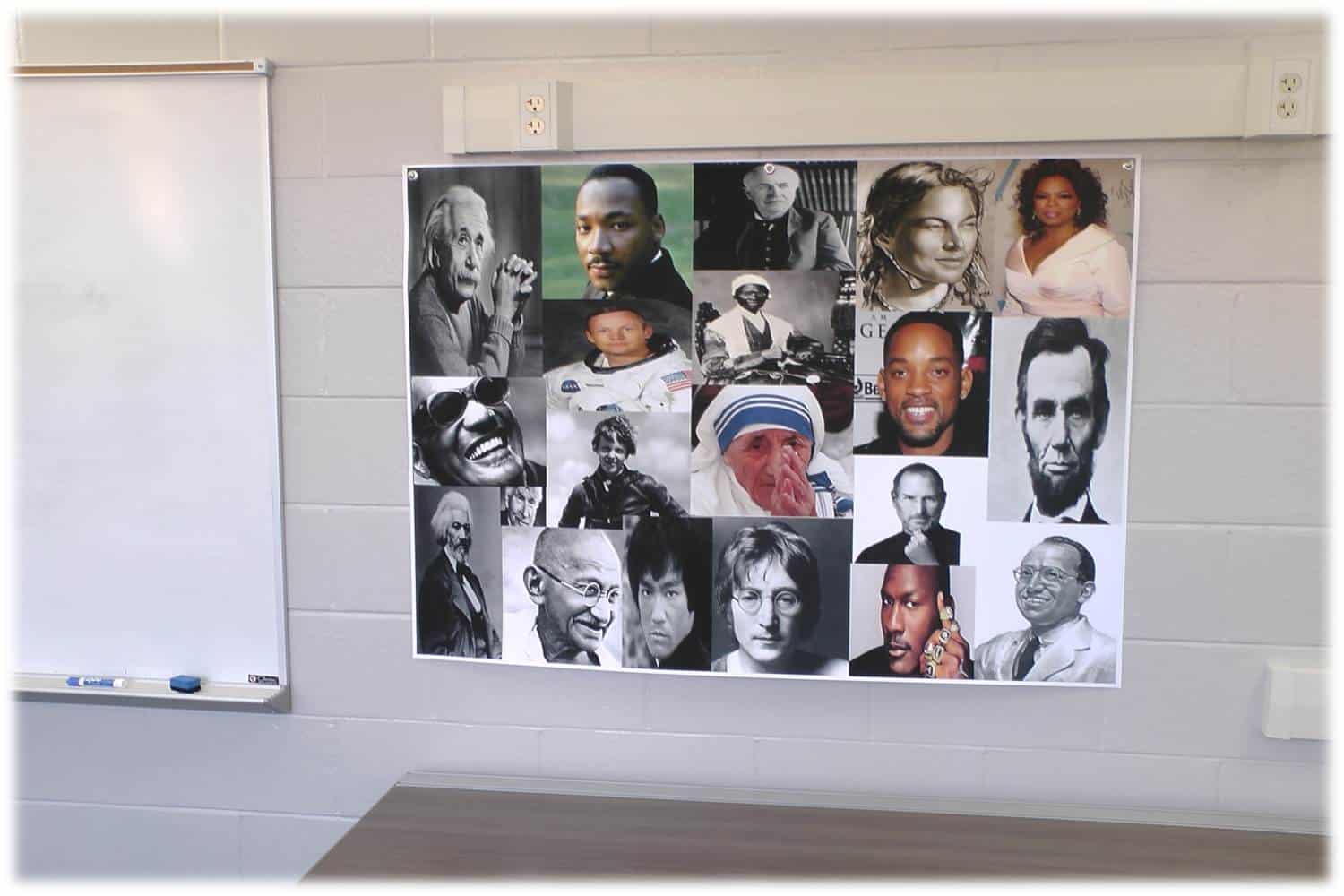
Our first zone, named after Malala Yousafzai, is located immediately inside the entrance to our blended learning academy. It is simple. With only two comfortable chairs, a small table, and one dry-erase board, this learning area beckons students to curl up with wifi-connected tablets or no technology gadgets at all as they brainstorm and collaborate about their next big creation or their next, epic educational stance. They need not look far for inspiration. A collage of diverse thinkers ranging from Will Smith to Mahatma Gandhi to Steve Jobs to Ray Charles hangs nearby and reminds all students that they are stepping into a room designed for greatness.   Collage of Greatness
 Currently top-secret knowledge at this time, our ultimate plan is to gradually replace these famous faces with expressions from our brilliant students to create the final collage at the end of the year. After all, students should believe themselves capable of the extraordinary.

The Tupac Zone
Tupac Zone
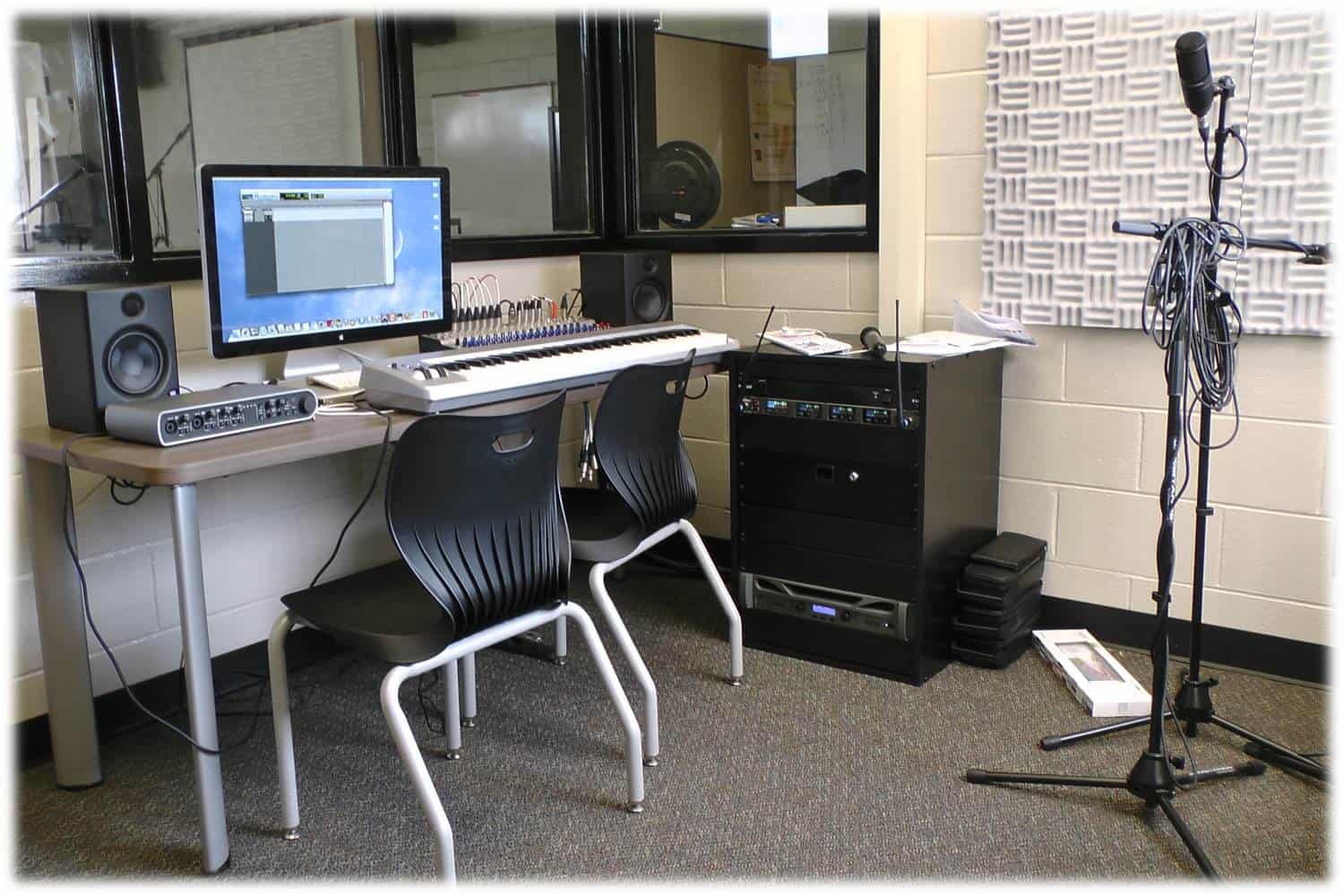
Not to glorify any negative actions but to lift up the potential of a truly dedicated and focused blended learner, a portrait of the often troubled but extremely talented Tupac Shakur and his inspirational poem "The Rose That Grew from Concrete" hang just above the entrance to our professional-grade music studio. Equipped with all the appropriate musical hardware and the highly-touted ProTools software, this music studio is ready to pump out high-quality tracks and lyrics. My years in Studio 113 taught me that music almost always gets the students’ attention. Whether they can sing or not, every student is curious about the process of crafting an original poem and setting it to music. I have witnessed students over the years who had no singing ability whatsoever who were filled with enthusiasm and engagement at the daunting task of demonstrating knowledge through originally written music. Even if the songs weren’t actually worthy of a download from iTunes, the assignment always pushed them way past finish lines normally marked by worksheets and preparation for standardized testing.

The Frida, Lennon, and Mandela Zones

Frida Lennon Mandela
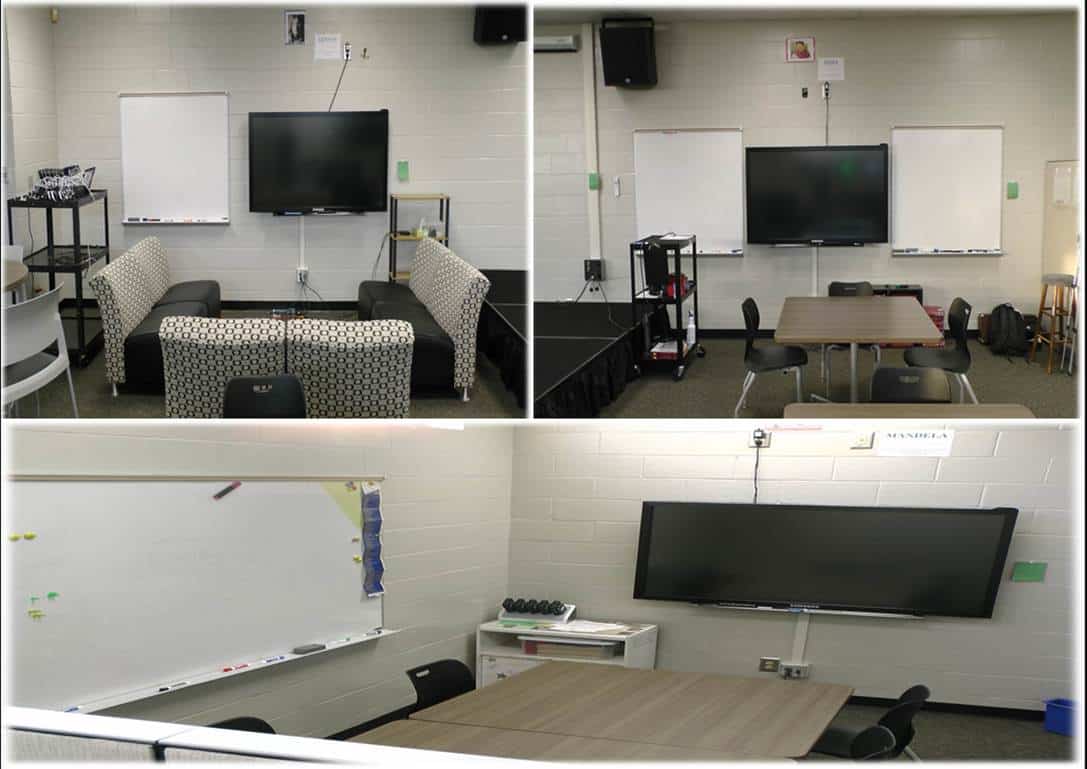
Named after Frida Kahlo, John Lennon, and Nelson Mandela, respectively, three of the seven zones contain 65-inch Samsung flat screens with touch overlays, or windows, that allow up to six simultaneous touches at once. These powerful tech screens also allow students to hook up their tablets or laptops through HDMI or VGA cables. By simply switching the “source” input on the screens, students can toggle back and forth from different computer screens. However, the Frida Zone’s Chromecast and the Lennon Zone’s Apple TV help add extra flexibility and efficiency by allowing students to share directly from wi-fi enabled tablets, laptops, and smartphones from any location in the room.  

The Lee Zone

Lee Zone
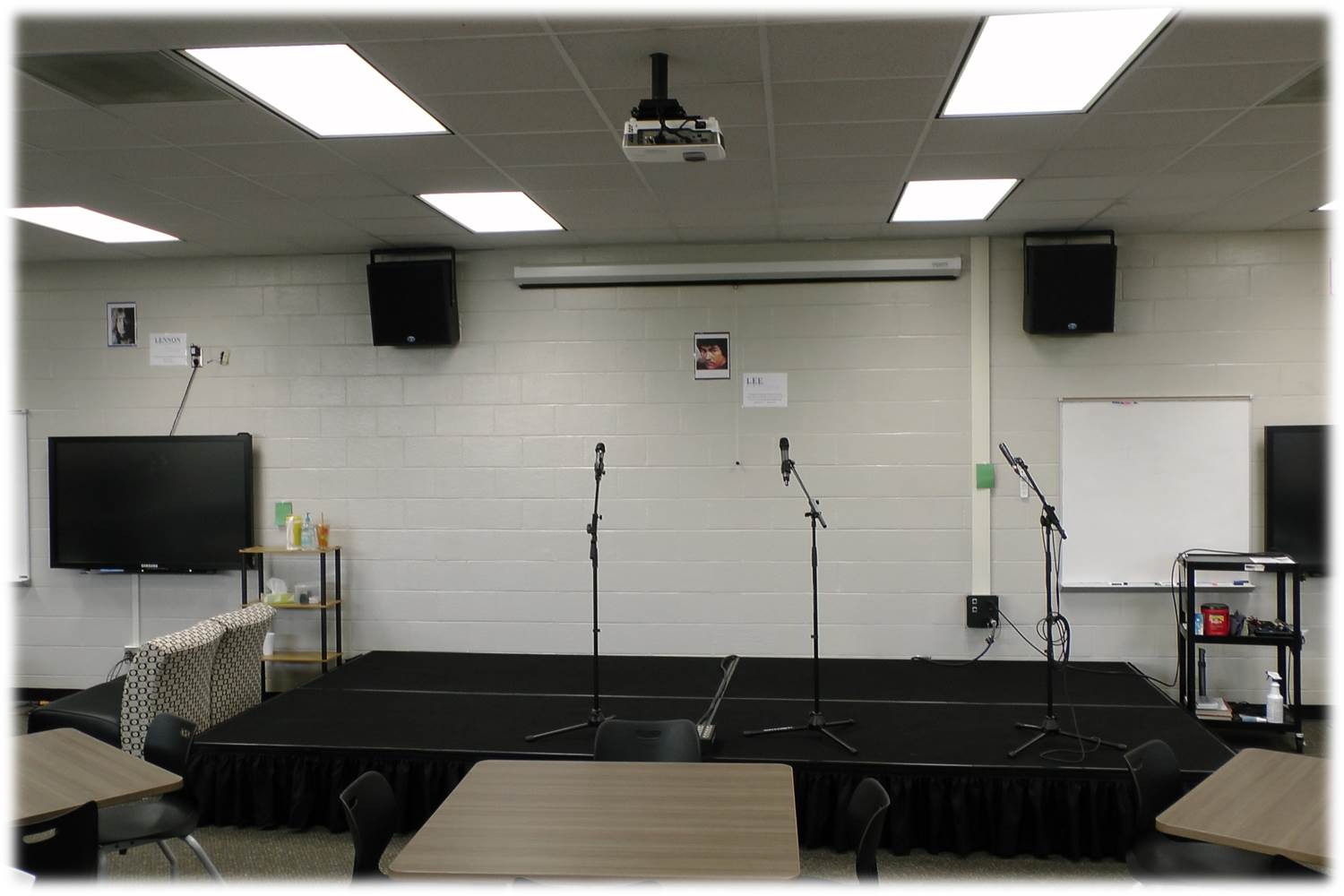
The energetic, rebellious, courageous, and gifted spirit of Bruce Lee encapsulates this zone. Comprising a six-section, portable stage that maxes out at 18” x 12’ x 16’, speakers that will absolutely rock the house, a pull-down screen, and projector, this zone is perfect for mind-blowing presentations and concerts. Furthermore, by reconfiguring the stage into different dimensions, an infinite number of gamified and interactive learning structures may be set up. These structures may stem from Whose Line Is It Anyway? or they may be some of the totally original ones created by our class as a whole. I can’t wait to show you some of our future presentations and interactive structures. Please stay tuned.

The Einstein Zone

Einstein Zone
This particular zone, named after the genius himself, adds pretty cool bit of technology. Enter the media:scape from Dekalb Office. Take a look at this picture, and you will immediately understand the concept. So far, our first two weeks have revealed this zone to be one of the favorites. This dual screen setup allows students to toggle to and fro from up to four computers. Students can choose to share their laptop or tablet screens by simply clicking on circular, push-button switch that shoots the image directly to one or both of the flat screens. As you can easily imagine, this zone is powerful for teamwork.  

Our Digital Learning Platform and Google Drive

To deliver our digital content, we use “Dell's and Intel's DLP user interface sitting on top of the Agilix BrainHoney learning management system.” (O’Dell). Our county has rebranded the digital learning platform, and we now refer to it as HallConnect. To provide even more 21st century technology tools to our students, our county has integrated the power of Google Drive into HallConnect. Students are absolutely blown away by the effectiveness and collaborative potential of creating and sharing all their work in Google Drive. Me? I’m pumped, too. I can’t wait to grade my first stack of essays with Voice Comment in Drive.

The Tech Gadgets

Our 1:1 program affords us the privilege of using Dell laptops, Dell tablets, and iPads, and to help with our full-scale movie program, as well as a multitude of other creative ventures, we have access to HD cameras, a 10’ X 20’ chroma key set, and lapel mics. Basically, if the students can imagine, they can create it.

Student Profiles

Student Profiles
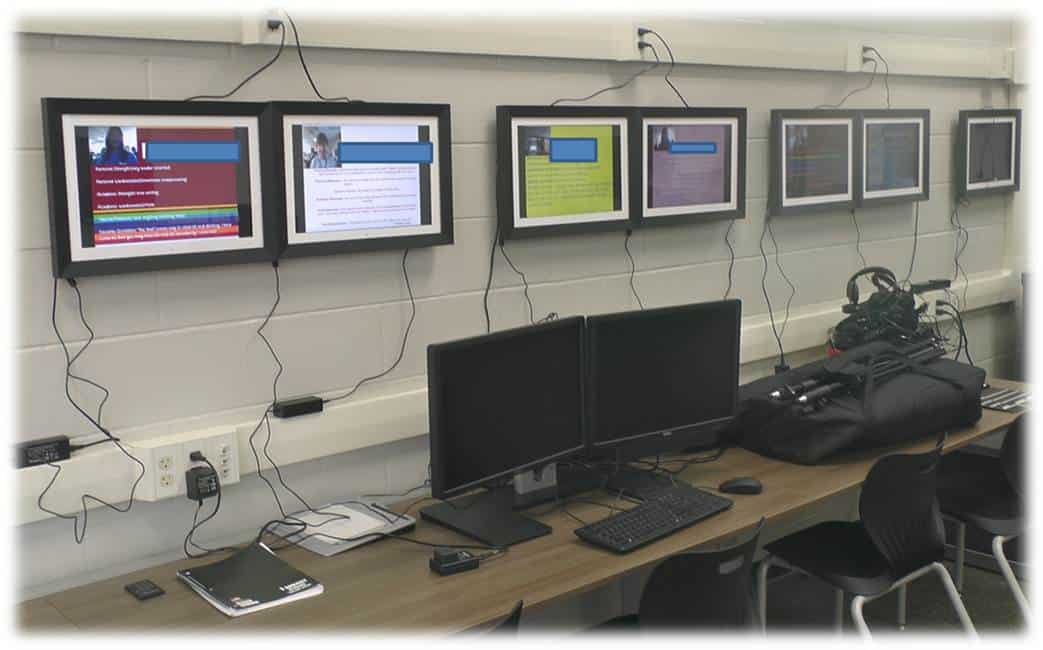
Perhaps the foundation of what we intend to accomplish in our blended learning academy can be found showcased on our entrance wall in digital picture frames. Scrolling through fifteen seconds at a time, the slideshows announce to our learning family the strengths, weaknesses, talents, and ambitions of our students. No weakness is too great to demand help, and no strength is too humble to hide and go unused. Modeled by the teachers also, students are asked to be as appropriately transparent as possible. Only in this way can students move forward.    

An Evolving and Flexible Schedule

As our program develops, we envision a day where “school” hours may resemble a two-shift factory instead of a traditional 8:00-4:00. Due to various conditions, some students in the future may not be able to be present in our physical classroom, but they will easily be able to work on their course content through HallConnect. To show mastery of the standards in a creative way or to seek extra help, students may check the master schedule and plan a time to visit our academy. At this time, students will have access to the latest educational and creative technology to complete original projects. And that’s not all. Students will be encouraged to register and attend interactive learning sessions where they can collaborate on an interactive level with their peers. It may sound funny, but, hey, it has worked for Home Depot. It’s been proven. People want to be creative, and they will show up when the learning is scheduled to begin.

The Sanctuary

The Sanctuary
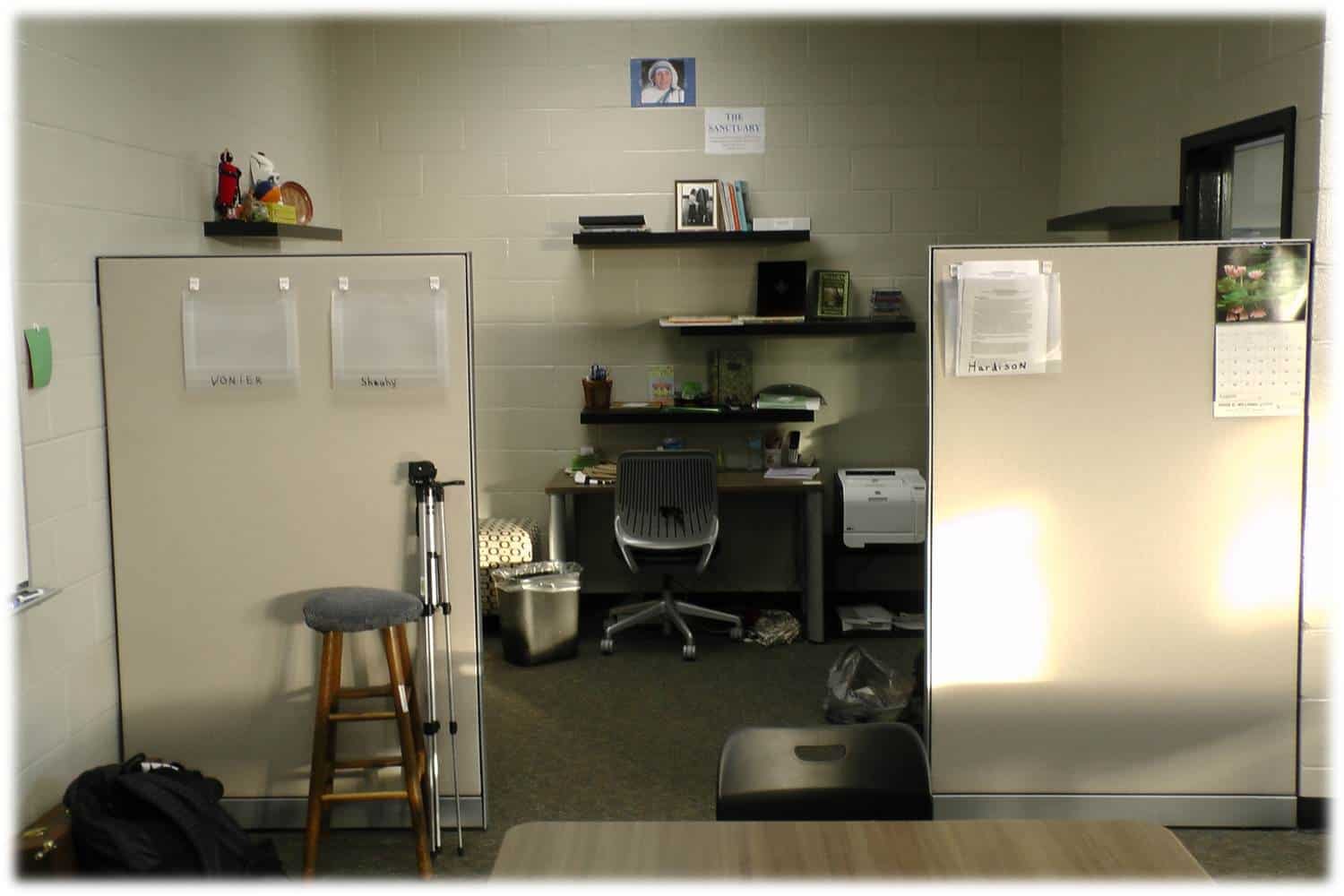
 Nestled back in our classroom, a 10’ x 12’ area serves as the teachers’ homebase, and high above Mother Teresa sets the atmosphere for what will surely be a sanctuary as we try to provide answers for all the questions we have about this first-year program. But there is no need to worry. And if there is, lyrics from Tupac will help us stay the course:
“That's right
I know it seems hard sometimes but uhh
Remember one thing
Through every dark night, there's a bright day after that
So no matter how hard it gets, stick your chest out
Keep your head up, and handle it.”
I’m sure Einstein would agree with these lines, even if my colleagues and I do have a different version of his famous equation. You see, whereas “E” equals “engagement” and “MC” stands for “many choices,” there isn’t anything square about this academy.  

Keepin' It Real with RealTime Boards: Online Collaborative Boards

(First published on gettingsmart.com on June 20, 2013.)

For a teacher, the summer affords so many opportunities for growth. Aside from the pure blessings of family vacations, recuperative time, and challenging, outdoor projects, June and July offer me a chance to improve my teaching craft. It is so nice to have the extra time to connect with positive educators via popular conferences or social media platforms like Twitter and learn of valuable resources, new pedagogical strategies, and effective educational technology tools. One such tool I learned of recently is RealtimeBoard.com. After an initial inspection and test run, I have decided to add it to my burgeoning Symbaloo list of worthy websites and apps. Here is a quick overview of an online collaborative board created within this user friendly website.
 

It is Free

Whenever I am perusing websites in search of potential, educational validity, I am reminded of a knee-jerk comment I utter whenever a student asks me for money. I usually show an empty wallet and respond with a terse and honest, “I’m a teacher; I have no money.” All joking aside, if standards-based mastery and student engagement constitute the atmosphere I wish to create every day, then the cost of using #edtech resources often acts as a thermostat. To be blunt, I rarely introduce an app or website to students unless there is a free version that helps them reach their learning objectives. RealtimeBoard offers unlimited public boards and up to three private boards for the free version. With this no-cost license, subscribers also receive 100 MB of storage, a maximum of 100 files per board, and all toolbar and sharing features. There is also no cutoff for the number of board collaborators. At the risk of sounding like a late-night infomercial (“But wait, there is more”), I would be remiss if I failed to inform you of the full-featured Pro account for teachers and students. Simply take the time to submit a few details that prove your status as a teacher or pupil and you will have access to unlimited private and public boards, unlimited files on each board, unlimited collaborators, 3GB of storage space, daily data backups, and fulltime e-mail support. All of that sounds like a pretty good deal for free.

Pros

In addition to the information mentioned above, here is a list of positives.
  • A wide range of custom templates that include: Blank, Mindmapping, Prototyping, Production Plan, Business Model Generation, SWOT, Project Canvas, Checkers, Weekly Planner, Venn Diagram, Lock/Mock/Analyze, and Six Hats.
  • A simple but effective toolbar that allows operations ranging from zooming in and out to uploading documents to embedding videos.
  • A chat button to communicate directly with collaborators.
  • A toolbar button that inserts mindmapping links that always stay connected even when objects are later rearranged.
  • Quick access to add frequent contacts to new boards.
  • The ability to set each board to private or public.
  • The power of integrating your Google Drive account with a RealtimeBoard.

Cons

Although I have not tested a shared board in the classroom, I have stumbled upon a couple of negatives.
  • RealtimeBoard requires FlashPlayer, therefore, it did not work on my iOS devices. As a huge advocate of BYOD and using smartphones in class, this one presents a challenge.
  • The second negative is a bit picky. I wish RealtimeBoard had video conferencing capabilities built in. I am sure I could do a Google Hangout and share my screen, but that seems a bit cumbersome.

Ideas for Educational Use

Not to oversimplify this subtopic, but the educational possibilities for RealtimeBoard appear limited only by one’s imagination. Here are some suggestions I will offer my students and colleagues:
  • Brainstorm and organize a shared, creative project with collaborators from anywhere.
  • Administrators can use a shared board to facilitate professional learning. Since teachers can participate in studying the topic at any time, professional growth will surely result from increased flexibility.
  • Curate valuable resources and minimize one’s workload by inviting others to help with the task at hand.
  • Welcome criticism on a nearly finished product (essay, presentation, video, etc.) before publishing it to the world.
  • Having a hard time showing a student where his talents fit in? Let him see for himself by guiding him to the correct board template before collaborating with others.
  • Make a research paper much more interactive by collecting all valuable information in a one-stop location.
Once I introduce RealtimeBoard to my students, I am positive they will teach me just how valuable the tool can be. Care to share your ideas? Simply view the explanation below and then dive in to the embedded board at the bottom of the page.
 

Brainstorming in RealtimeBoard


Blended Learning That is Truly Blended

(Originally published on GettingSmart.com on May 10, 2013.)

One aspect of education that will never change is the incessant introduction and demise of buzz words. These days educators are discussing flipped classrooms, flattened classrooms, MOOC’s, infographics, gamification, and, of course, blended learning. Even though blended learning is erroneously becoming synonymous with online, digital learning, it is arguably the most intriguing and perhaps the least mastered of all current buzz words. According to Rob Bock, The Lexington Institute contends “that many schools have embraced the term ‘blended learning’ without grasping its true significance.” Blended Learning HardisonAs my progressive school district in Hall County, Georgia moves forward with the creation of our first Blended Learning Academy, the four concepts of self-knowledge, shared knowledge, student learning options, and an inspirational facility remain at the forefronts of our minds. To me, this hot-topic, instructional method is quite straightforward, and, ironically enough, the main ingredient of its effectiveness lies in its name. In fact, a successful blended learning model is simply…blended.

Self-Knowledge

Although the four concepts mentioned above are equally interdependent, the notion of self-knowledge is seemingly foundational. Even the famous martial artist and philosopher Bruce Lee would have agreed. According to him, “A great deal of pure self-knowledge and inner understanding allows us to lay an all-important foundation for the structure of our life from which we can perceive and take the right avenues.” Think about it. How many times were you asked the right questions as a student? Questions such as: What are your talents? How do you learn best? What distracts you from learning? What are your most challenging weaknesses? What ignites your curiosity? Who was your favorite teacher of all time and why? How will (insert course name) advance you towards your ultimate goals? Without playing an armchair psychologist, all teachers can do one magical thing before ever assigning any learning tasks: allow students’ voices to be heard by challenging them to examine their learning styles, strengths, weaknesses, ambitions, and passions. What will they gain? Self-knowledge. What will you gain? Students who know exactly what they want and how they plan on getting there.     Want to see our first assignment for students entering the Blended Learning Academy at East Hall High School? Take a look here.

Shared Knowledge

Another pivotal principle of a successful blended learning academy is shared knowledge. Without a doubt, all productive environments, whether an educational institution or a Fortune 500 company, practice sharing knowledge. By encouraging students to be transparent learners, they exemplify the wise saying from Ben Franklin, “An investment in knowledge pays the best interest.” Here are just a few ways our blended learning team will foster such an environment. First, students will fashion their own personal profiles in such a place as to be visible by all. Each profile will begin with a student picture just above a detailed list of his/her weaknesses, strengths, talents, interests, and aspirations. Of course, this information stems from the student survey mentioned above. Also, each student will be asked to post the current status of in-progress projects or assignments, as well as any areas of needed help. By encouraging, not forcing, students to be transparent and honest with their education, a wealth of shared knowledge is created and maintained by individuals who realistically see themselves as “works-in-progress” and as possessors of unique talents and abilities. This student profile will not be limited to only students. No, sir. No, ma’am. My teacher profile will be posted also with an eager request for anyone, student or teacher, to help me learn Spanish. All notes will be shared by using Google Drive and by merging Evernote with IdeaPaint. Frowned upon gadgets like smartphones will be welcomed, and social media giants Twitter and Facebook will be leveraged to constantly share knowledge. Likewise, YouTube and SchoolTube will be our digital vehicles to transport our knowledge all around the globe.   To further enrich this culture of shared knowledge, two distinct walls will anchor our facility. A Past & Present wall will showcase digital and physical artifacts of exemplary student work. Imagine a perfected essay held by a small picture easel just below a ray of soft lighting. Whether the work of art is a rap parody with originally written lyrics or a mashed-up video showcasing an authentic rendering of algebraic equations, imagine a student’s digital project looping continuously on a wall-mounted flat-screen. In fact, just imagine amazing products that demonstrate mastery of standards from all courses. No matter if the products are digital or physical. As long as they represent knowledge, they should be shared. The second wall is equally as powerful. The Future wall will showcase a physical and digital shared Google calendar to keep all students abreast of the ever-evolving activities. A la the movie Good Will Hunting, students will also be encouraged to challenge their peers by posting unsolved problems, unfinished thoughts, unanswered queries, and unfulfilled requests for help on educational assignments.

Options

With a learning model bolstered by self-knowledge and shared knowledge, limitless options to show students’ mastery of standards is a discernible reality. Like I mentioned earlier, blended learning is NOT just digital learning. It is not, and cannot, simply be the image of a student tapping away on a computer while he consumes online content and has all surroundings muffled by oversized and overpriced headphones. I have witnessed some online courses that are basically digital versions of the same boring worksheets that have been so tirelessly thrown at kids for decades. Can online courses work? Absolutely. Are online courses synonymous with blended learning? Absolutely not. Blended learning is all about options that originate from inviting students to be co-leaders of their own education. Having devoted sufficient time for introspection, students are able to discuss with their content facilitators (formerly known as teachers) how they would like to reach certain standards or accomplish educational goals. Here are just a few examples of the options offered to our students:
  1. Master the standards by completing coursework through our online platform, HallConnect.
  2. Flip a classroom and be a part of creating a full-length movie (soundtrack, manuscript, and all recordings).
  3. Write and record an original song.
  4. Participate in interactive, whole classroom structures.
  5. Produce artistic creations that demonstrate knowledge.
  6. Use any digital tools to show mastery.
  7. Add to an online portfolio.
  8. Blog to the world.
  9. Participate with other students from around the world through video-conferencing tools.
  10. Gamify lessons.
  11. Construct models made of clay, wood, Leggos, etc.
  12. Engage in face-to-face, individual learning with a content facilitator or classmate.
Did I leave something out? No worries. If so, it will be covered by allowing students to self-prescribe a standards-based assignment in a detailed project/problem/passion-based contract. If all invested parties (students, parents, teachers) agree, the contract is signed and the learning begins.

The Facility

Every educator knows the facility that houses a learning environment is crucial to the success of the inhabitants. Without a doubt, the options mentioned above demand a flexible, “breathable” learning environment. And this is exactly what we plan on giving the students. Equipped with a portable 16’x 12’ stage, a musical recording studio, multiple flat-screens, a rocking audio system, a video-conferencing room, a student lounge with soft seating, student tables glazed with IdeaPaint, and an army of laptops and tablets, the Blended Learning Academy at East Hall High School will be absolutely nothing short of amazing. I wish I could walk you through the facility right now. However, our dream is taking shape at this very moment. It has involved a lot of hard work. We have shared knowledge. We have assessed the options. And our students will soon stand at the threshold of greatness. Hmmm. That sounds like learning to me. Learning that is truly blended.     

Infinity: The Size of Today's Classrooms

(Originally published on GettingSmart.com on April 25, 2013.)

There was once a time when contemplating tearing down my classroom walls fancied me wearing a yellow safety helmet and operating a wrecking-ball wielding crane machine. Surely after knocking down windowless walls of cinder blocks with a sledgehammer I would have reluctantly exchanged my yellow hardhat for a striped jumpsuit with numerical identification. No need to get caught up in such fruitless delusions anymore. Not with all the technology gadgets available to educators. In fact, a little ingenuity and a toolbox equipped with digital tools are all teachers need to flatten traditional learning environments and discover the real size of today’s modern classrooms…infinity.

A Model Lesson Plan

After experiencing the power of Google Forms as a sounding board for my Advanced Placement Language students to peer-assess their analytical essays, I was extremely confident the same structure would work with any class, even one on the other side of the school district. Due to the successful first run with Google Forms as a means of peer-assessment in Studio 113, I knew the only impediment to connecting with a class from a different school would be matching up schedules. After speaking with a respected colleague, Denise Ramsey of Flowery Branch High School, the blueprint for a limitless class and lesson plan began to take shape. The walls came crumbling down. Mrs. Ramsey and I embarked on a plan to merge my East Hall students with her Flowery Branch students in a two-week attempt to once-and-for-all conquer any weaknesses and misunderstandings with the analytical prompt of the AP Language exam. Our plan consisted of two phases.

Phase 1

Just before Spring Break, students in both schools on the same day composed analytical essays stemming from a common prompt. All students had just fifty minutes to read the prompt and passage, to brainstorm for writing ideas, and to craft a well-written analytical essay worthy of a solid score from the AP Language free-response rubric. The students’ essays were exchanged via our district mail courier in only a couple of days. Under the anonymity of assigned numbers, the students were then asked to critique two-to-three separate essays using this Google Form. For the next week, both Mrs. Ramsey and I continued to follow our individual curricula while setting a flexible due date for all peer-assessments. All essays were eventually reviewed, and a live link was shared with students from both schools while I worked on polishing up the final spreadsheet in Microsoft Excel. To say the students were eager to read the constructive criticism found on the live link is a gross understatement. They experienced a range of emotions. They were ecstatic, disappointed, surprised, pleased, angry, and frustrated. Overall, however, they were challenged to improve. Once Phase 1 was completed, the second part of the plan was ready to begin.

Phase 2

For several days, my colleague and I discussed essays with our respective students and tried to ascertain solid feedback. What did the students think about the process? Were their assessments and scoring accurate? Were the students tougher on each other than the teachers may have been? Overall, did all students receive information that will ultimately lead towards improvement? To discuss the success of Phase 1 and to practice dissecting another analytical prompt, we decided to virtually connect both classes using Microsoft Lync, a video conferencing and instant messaging program made available to our district this school year. The success of two Twitter tweet-ups with colleagues and students from Virginia and New Jersey proved to me that classrooms are limited only by one’s imagination. Conducting a virtual class across the county would be no problem. Armed with iPads and laptops, students were easily directed to the four main websites when our classes “Lync”-ed up. These four sites were: my AP Language teacher page, a TodaysMeet backchannel, the shared spreadsheet of all peer-assessed essays, and the link to the next prompt to be discussed. Take a look at the video below to view the setup for our virtual class that took place on April 18th. Although we ran out of time on this particular day, the overall lesson was already a success. Care to watch the class in action? If so, scroll down and click play. If you are looking to connect with a class of eager students but can't see past the mortar and blocks, don't reach for an archaic demolition tool. Instead, hit me up on Google Hangouts, Skype, Lync, or even FaceTime. We can plan out a rocking lesson plan and watch the walls crumble around us. Trust me. The view will be amazing. And the possibilities...infinite.

60 Seconds & a Camera: Essentials for a Culminating Activity

(Originally published on GettingSmart.com on April 10, 2013.)

Watch     Please excuse any unintentional misleading as suggested by the above title. In all exactness, the blueprint for rendering a solid “60-Second Recap” is a bit more involved and time-consuming, but the clockwork immersed in the process is replete with analytical and interactive reading, classroom ownership, creativity, and autonomy. Before detailing the foundation and framework that constituted the “60-Second Recaps,” take a look at these examples from our American Literature classes that culminated in one minute and one camera.

“The Outcasts of Poker Flat” by Bret Harte (60-Second Recaps)

How did we get there? Here is our meticulous path to success.

Working & Reading the Assigned Literature with an Interactive Structure

For the assigned study of Bret Harte’s “The Outcasts of Poker Flat,” our class in Studio 113 created another interactive learning structure to guide us through the character analyses, the author’s style and diction, and any examples of American literary genres. The “Audience and Actors” interactive structure invited a fixed team of volunteer actors and actresses to bring the literature to life. Seated around the stage in the center of our classroom, these gregarious students performed certain scenes when prompted by the teacher or when requested by the students. Positioned on the stage, a team of volunteer readers kept us moving through chunks of literature at an appropriate pace. Using the TodaysMeet backchannel and armed with iPads, smartphones, and laptops, the audience of four stations had plenty to do. Station 1 searched for proof of Realism, Regionalism, and Naturalism. Station 2 created character profiles of Mother Shipton, the Duchess, Piney Woods, John Oakhurst, Uncle Billy, and Tom Simson. Our team of actors and actresses did their best to resemble the suggestions from Station 2. The students in Station 3 challenged their peers by modeling Socratic thinking. Next to the hilarious acting, these thoughtful questions prompted many unique and upper level responses from Station 4, which was asked to comment verbally or non-verbally through our established backchannel. To maintain an open atmosphere where no thoughts or ideas were squelched, all students were asked to comment via the backchannel while maintaining a primary focus as assigned per station. To be quite honest, the rotation of the audience members for all four stations was not meticulously timed. Instead, it was very fluid and flexible. I simply relied on the data produced from my teacher’s heart to determine when to transition into the next stations. It took nearly three class periods of fifty minutes to finish our reading of Bret Harte’s famous short story.

Introducing the 60-Second Recap

After a quick, traditional class discussion that cleared up any misconceptions about the assigned literature, I used this 60-second recap of Forrest Gump and this awesome website to introduce the collective challenge. I was also quite certain a video of famous movie mistakes would set the tone for focusing on all details. Click here to see the video that got the students’ attention.

Fostering Spontaneity and Creativity

I am a firm believer that our current educational system is not fostering spontaneity and creativity at a satisfactory level, so any quick activities to energize a class and set the atmosphere for ingenuity will not be lost instructional time. In fact, think of the activities as investments for the upcoming, creative project. Want to see how students from Studio 113 got energized to brainstorm and create their 60-second recaps? Take a look at this activity.

Brainstorming the 60-Second Recap

No magic for this model of brainstorming. Using the traditional, one-hand-at-a-time model of class discussion, the students and I started with simple sheets of paper that were marked to replicate the site of our final performance: the old football field and track located behind our school. Starting from the “endzone” and modeling all notes on the smartboard, I guided the students through a blueprint of our 60-second recap. Every five-to-ten lines on the students’ college-ruled sheets of paper mimicked the five-to-ten yards on our old football field. Through a totally spontaneous but organized format, the plans for our recap took shape as students volunteered to play characters, agreed to build props, offered to film the recap, claimed leadership roles, suggested literary details, checked the local weather for an appropriate filming date, and ultimately found some way to add to the project. The students were asked to “get off the bench” and participate in some manner, and all of them found their niches.

Rehearsing and Filming the 60-Second Recap

Thankfully enough, the very next day was perfect for filming the recaps. The weather was cooperative, and the students brought all necessary props and supplies (thanks to using their smartphones as calendars and reminders). After about five rehearsals to work out the kinks, the students exhibited complete autonomy as they performed their version of “The Outcasts of Poker Flat.” What did I do during this time? I said nothing and stood high above in our band director’s raised platform. Take a look here at my bird’s eye view.

Mashing Up the Video

The final videos, which were actually over two minutes long per class, were edited in MovieMaker Live. After silencing the original audio and tripling the videos’ speeds, Mixcraft 6 was our technology tool of choice to drop in the final narration. Normally, students collaborate and use our in-class microphones and recording booth to perform the narrative audio file. However, our actual recording day just happened to fall on the Friday before Spring Break, so the voice you hear on the 60-second recaps is mine. Obviously, the narration would have exemplified much more talent if the students had been able to record their voices as the characters. In closing, I can hear the naysayers arguing that the 60-second recap is only good for Language Arts or Drama classes. I beg to differ. I imagine 60-second recaps that artistically represent geometric shapes, that personify the elements of the periodic table in a well-crafted story, that classify the various organisms studied in Biology class, that symbolize the appropriate steps in solving a complex algebraic equation, and that… Oh, well. I guess I should stop here because there honestly is no limit to what we as creative and connected educators can do with this innovative activity. Besides, my sixty seconds are up.

22 Power Cards to Revolutionize a Class Discussion

(Originally published on GettingSmart.com on March 27, 2013.)

  [caption id="attachment_27836" align="alignleft" width="290"]John Hardison & Mark Anthony as Power and Double Whammy Cards John Hardison & Mark Anthony as Power and Double Whammy Cards[/caption]

  The excitement generated from the interactive learning structure I am about to reveal will definitely not be confused with the impact felt from the French and American Revolutions or the Civil Rights movement, but the student engagement and creative energy resulting from one of Studio 113’s non-traditional formats for class discussions was born out of a sort of rebellion. It was a rebellion of the boring. A polite but honest rebellion of a trite and played-out structure for class discussions. Four years ago, our AP Language students had conjectured, argued, supported, and qualified an innumerable amount of analytical and persuasive prompts until their eyes were glazed over from a robotic and hypnotic form of class discussion…the one-hand-at-a-time method. Don’t get me wrong. The students did not throw pens, put their heads down, or refuse to participate. Their increasingly lethargic expressions and uninspired answers said enough. The traditional model was not working. They needed a change. So, my colleague and I turned to some trusty characters and powerful forms of expression. How do characters like Santa, Yoda, Superman, and Socrates sound? What about powers labeled nose-to-nose, apps, sing, and resurrection? Sound boring? Enter the twenty-two power cards to revolutionize a class discussion.

Revolutionary Battle: Gamifying Literary Analysis with 22 Power Cards

Titled “Revolutionary Battle” because of its resemblance to the way soldiers lined up just before firing against their enemies during the American Revolutionary War, this gamified approach to analyzing literature is tried-and-true. Although different in design from our original “Wax Museum” and “Voting Chips” learning models, the “Revolutionary Battle” produces a comparable and enthusiastic learning environment. Perhaps the only issue is one any teacher would surely welcome: how to manage so much student creativity and excitement. Simply let the assigned literature and standards, the twenty-two "Power Cards," the seven "Double Whammy" cards, a trusty technology tool that serves as a backchannel, a couple of timers, and a scoring rubric manage all of the students’ energetic responses.

Revolutionary Battle: A Step-by-Step Process

Providing the Foundation-As always, the first step was to assign the standards and literature. For the examples shown in the embedded video below, our AP Language students were asked to analyze Lopate’s “Modern Friendships” and Tannen’s “Rapport-Talk and Report Talk.” Each team was asked to demonstrate a mastery level of understanding of one of the two essays by successfully defending any academic challenges or attacks from the opposing teams. Likewise, both teams defended one essay and attacked the other. Reading both essays was a must. Drafting Teammates-While the remaining students began reading, two volunteer captains met in private with me to select their peers from a digital roster. As both captains took turns crafting their teams, I highlighted the students’ names to indicate the availability of the remaining students. Furthermore, I cautioned both captains to construct well-rounded teams. The anonymity of the draft was non-negotiable, and the order of the draft was not disclosed to the rest of the class. Drafting the Power Cards-Immediately after selecting the teams, the two captains announced the teams, and both teams went to opposing locations to begin quietly reading the literature and plotting their game plans. Students were also asked to study the list of twenty-two “Power Cards” and seven “Double Whammy” cards. “Power Cards” allow students to demonstrate their knowledge in very creative ways, whereas the “Double Whammy” cards present disruptions to the opposing team or save teammates from struggling presentations. Both teams began the following day’s class by systematically picking their “Power Cards,” one per teammate. Although the seven “Double Whammy” cards may be selected at any time, they are considered to be held by each team and not just one individual. A total of three “Double Whammy” cards may be chosen, and the order they are selected in the draft could be detrimental to each team’s success. Picking too early will allow the opposing team to snatch up a strong “Power Card,” but picking too late may rule out a saving “Double Whammy” card. As with any draft, timing is everything. Want to see the result of using Photofunia to create all twenty-nine cards? Click here. For the complete list of cards and descriptions, please take a look at the PDF file embedded below or click here. Preparing for Battle-The first task for both teams was to prepare for the opposing team’s attack by thoroughly reading and discussing the literature. This was usually completed in two class periods. The second task (usually homework) was to read the second piece of literature while formulating creative questions to test the other team’s knowledge. These questions, analytical and rhetorical in nature, were definitely of the AP Language level. Beginning the Game-A coin flip quickly revealed the order of attack. The attacking team had thirty seconds to step onto our six-sided stage and begin delivering the question to the other team. Each question was repeated, and a specific “Power Card” from the opposing team was chosen. The defending team had two minutes to formulate a response. When the online timer buzzed, the defending team mounted the stage and answered the prompt. Afterwards, the two teams switched roles. Want to see it in action? Take a look at this embedded video. Scoring the Rounds-Once both teams have attacked and defended, a score is recorded for each team per round. This score ranges from 1 to 5 (1=awful, 2=poor, 3=average, 4=good, 5=awesome) and takes into consideration the difficulty of the prompts. The game is completely over once all “Power Cards” have been exhausted. The “Double Whammy” cards, which may be submitted at any time, should be used before a team spends its last “Power Card.” Keeping Students Engaged/Active After Performing-Once a student presented his response and his “Power Card” was defunct, he was asked to join our on-going back channel via Todaysmeet. On this backchannel, students continually discussed the answers delivered by their peers. The only way students will not be involved in the backchannel is if they are somehow brought back into the game by specific “Power Cards” or “Double Whammy” cards. So, if you ever find your students staring back at you with numb eyes during a class discussion, remember the “Revolutionary Battle” learning structure from Studio 113. I promise it will energize a sedentary class of students by providing them with challenging and creative outlets to express their understanding of the assigned content. The result will be a powerful class involving active learners and a reinvigorated, facilitating teacher. In our classroom, that’s called a double whammy. Want to experience these interactive learning structures and more? Join me for a three-hour workshop at ISTE 13.